Blackbox 0.1: a flight recorder for your PC
The first public version. On first launch it reads 30 days of Windows history and turns the crashes, freezes and restarts it finds into reports you can read, then keeps recording.
Blackbox 0.1 is out. It’s a free Windows 11 app that works like a flight recorder for your PC: it keeps a record of what the machine was doing, and when something goes wrong, it explains what happened in plain language with the evidence one click away.
Why it exists
When a PC crashes, Windows writes down that it crashed. Sometimes it names a driver. What it doesn’t keep is the context: the temperatures, the clocks, the program on screen, the driver that was updated two days earlier. Finding the cause means piecing together Event Viewer, Reliability Monitor and crash dump files, and then guessing at the rest. Most people give up and reinstall something.
Blackbox does the piecing together, and keeps the context Windows throws away.
Useful on first launch
A recorder is only useful after something goes wrong, which is a hard sell for a new install. So the first thing Blackbox does is read the history Windows already has: 30 days of event logs, the crash files that were saved, and the driver and update history. As soon as it is installed, it can tell you how many times the PC crashed, froze or restarted unexpectedly this month, and what each one looked like.
30 days before installRead from Windows’ own logs on first launch
From then onRecorded live
Install
Processor and memoryevery 1 s
Sensors: GPU temperature, drives, clocksevery 2 s
Top processesevery 5 s
From then on it records live: processor and memory every second, temperatures and other sensors every two seconds, and the busiest programs every five. That detail is kept for seven days, so the minutes before the next incident are always on hand.
Reports, not log dumps
Every incident becomes a report. The most likely cause comes first, with a label for how sure Blackbox is: strong evidence, likely, possible, or inconclusive. There are no confidence percentages, because a number like “73%” would claim a precision the evidence doesn’t have. Below the cause are the facts it rests on, a timeline, the readings around the incident, and one to three safe steps to try.
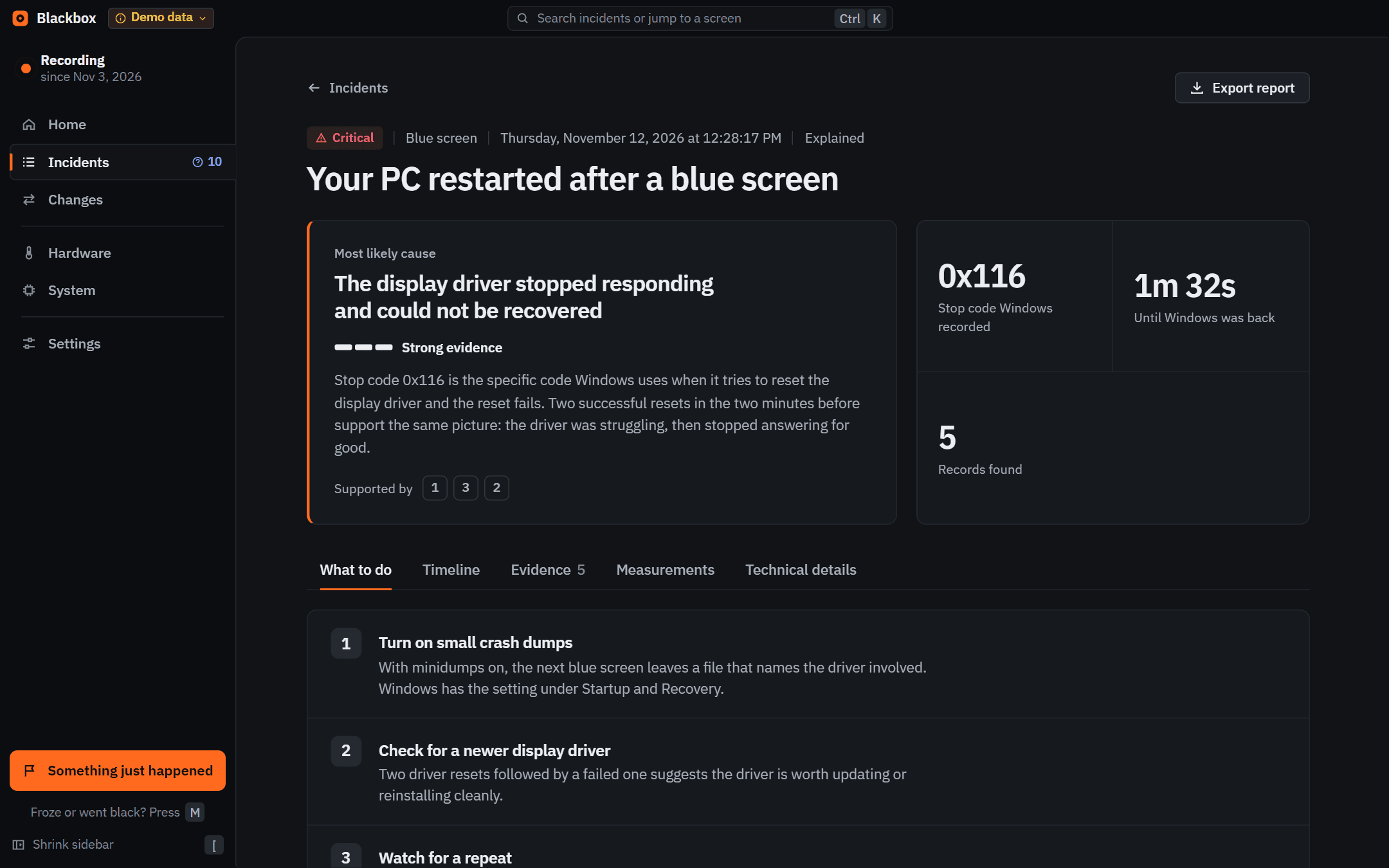
Each statement in a report links to the record behind it: the event, the crash file, the reading. If a reading isn’t available, it’s shown as missing, never as zero.
What else is in 0.1
- Home: incidents this week against last week, a breakdown by kind, and live readings.
- Hardware: temperatures, clocks, drive health, graphics card power and fans, with their history.
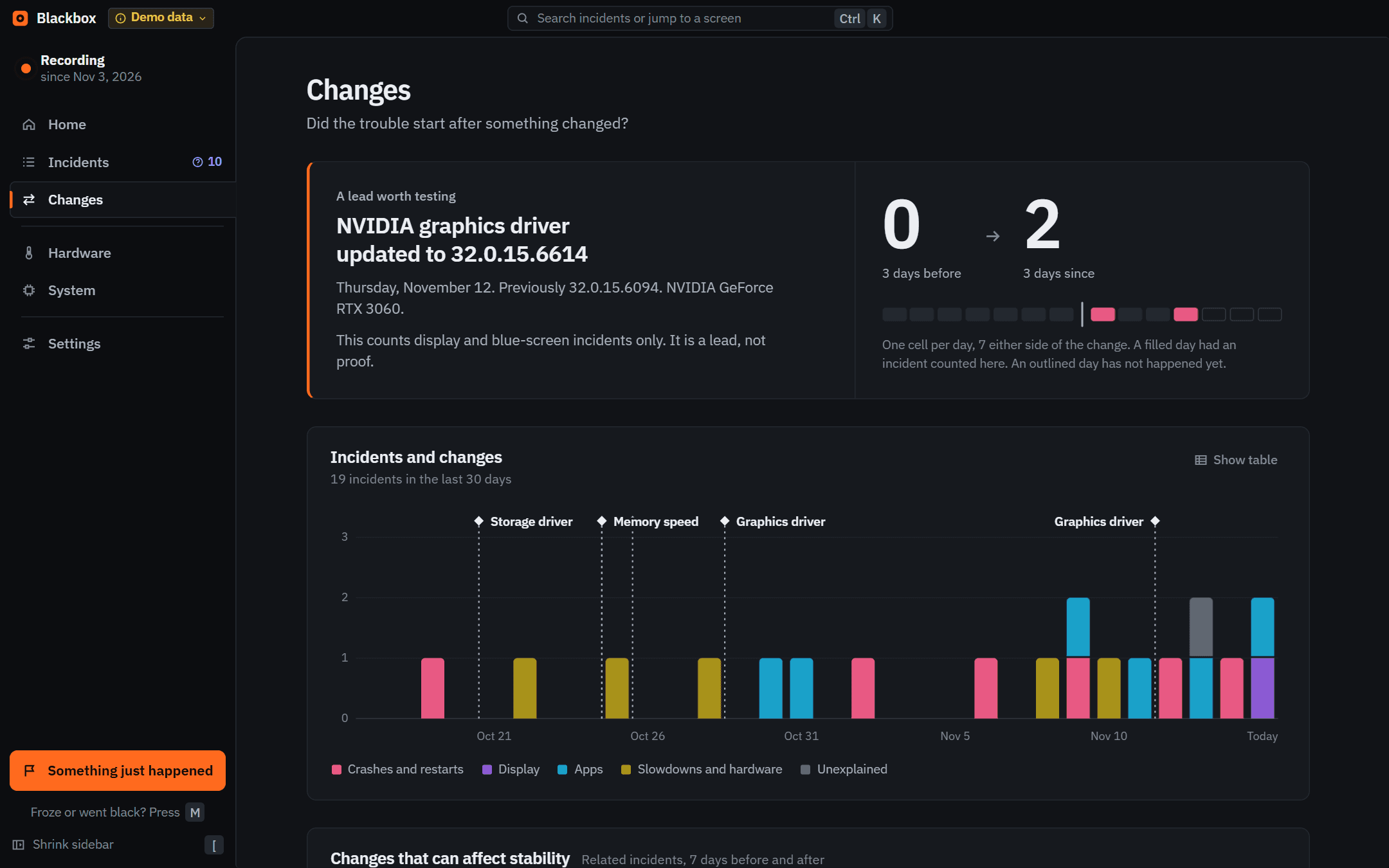
- Changes: driver installs, Windows updates, BIOS and app changes on one timeline, because “it started after an update” is one of the most common answers.
- Export: any report to Markdown or HTML, to keep or to share on a forum.
It stays on your PC
Everything Blackbox records is stored on your PC. There’s no account and no telemetry. Version 0.1.1 added the one network request it makes: once a day it asks GitHub whether there’s a newer version, sending only the version number. You can turn that off in Settings.
It’s also read-only. Version 0.1 changes nothing on your PC. It suggests safe steps and leaves them to you.
What it doesn’t do yet
An honest list, since a diagnosis tool that overclaims is worse than none.
- Processor temperature needs a kernel driver that Windows doesn’t provide. Blackbox reads it only when LibreHardwareMonitor or OpenHardwareMonitor is running. Graphics card and NVMe drive temperatures work without it.
- SATA drive health needs administrator access, so it shows as not available. NVMe drives are read directly.
- Detailed graphics readings (clocks, power limits, throttle reasons) come from NVIDIA’s library, so they’re NVIDIA only for now. Temperature and load come from Windows itself and work on most cards.
- The installer isn’t code-signed yet, so Windows SmartScreen will warn you before it runs. The download page lists each file’s SHA-256 and a VirusTotal scan so you can check it first.
What’s next
Next up are a signed installer and early warnings: telling you when corrected hardware errors start repeating, a drive’s health is falling, or temperatures are creeping up, before any of them becomes a crash. After that, reversible one-click fixes, the option to ask questions about an incident in your own words, and a dashboard for people who look after several PCs. The roadmap has the detail.